Garage Bucket Aliases As Hostnames
The Problem
In a previous post (Locally Hosted ISO Store with Garage) I explained why it was I wanted an ISO store, and explained that I wrote a quick script to achieve that. The Garage ISO store works great, but there is a new problem. What if the TrueNAS system hosting it dies?
The answer for most would be obvious, Garage supports multi-node clusters1, so I should simply cluster the two instances. As much as I would like that idea, my TrueNAS systems are in a hot/warm setup to reduce heat/power draw. The rack sits in a closet, and the power in my home is not all that stable. The “warm” TrueNAS system is powered on, but to reduce power the pool is set to power down the disks. The power savings aren’t incredible, but, 40 watts, is still 40 watts.
So here is the goal: I want to be able to assign a “hot” system, and swap over/pull from the “warm” system without needing to make any configuration adjustments on any clients. All clients should have basically no idea I have swapped physical hosts.
The Solution
The solution here is fairly simple, use DNS CNAMEs. The “hot” (green) system replicates to the “warm” (blue) system daily via ZFS snapshots, and the hot system is selected via a DNS CNAME.
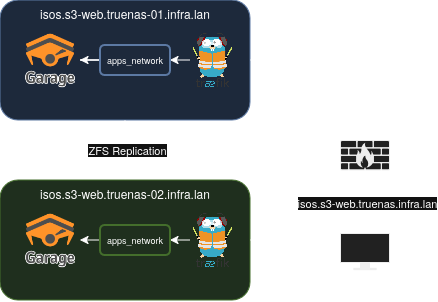
DNS Setup
All I need to do to get started is add the DNS records, like so:
| Type | Record | Value |
|---|---|---|
| A | isos.s3-web.truenas-01.infra.lan | 192.168.10.11 |
| A | isos.s3-web.truenas-02.infra.lan | 192.168.10.12 |
| CNAME | isos.s3-web.truenas.infra.lan | isos.s3-web.truenas-02.infra.lan |
*.s3-web.truenas-02.infra.lan) your CNAME will not resolve to an A record. You can still have a wildcard DNS record, (like: *.s3-web.truenas-02.infra.lan) but the CNAME must point to a non-wildcard record (like: isos.s3-web.truenas-02.infra.lan). I believe this to be a dnsmasq limitation.Traefik Setup:
Traefik is the reverse proxy in use on my TrueNAS systems, because replication is handled via ZFS, and I want to be able to simply spin up the “warm” system, should the need ever arise, Traefik must be configured to respond to all three record types. This can be done easily with a config like below:
http:
  routers:
    garage-web:
      service: garage-web
      rule: "Host(`*.s3-web.truenas.infra.lan`) || Host(`*.s3-web.truenas-01.infra.lan`) || Host(`*.s3-web.truenas-02.infra.lan`)"
      entryPoints:
        - "https"
      tls:
        certResolver: "cloudflare"
        domains:
          - main: "*.s3-web.truenas.infra.lan"
            sans:
              - "*.s3-web.truenas-01.infra.lan"
              - "*.s3-web.truenas-02.infra.lan"
  services:
    garage-web:
      loadBalancer:
        passHostHeader: true
        servers:
          - url: "http://garage:30189"
You can see above Traefik will respond to, and TLS certificates are configured for:
*.s3-web.truenas.infra.lan*.s3-web.truenas-01.infra.lan*.s3-web.truenas-02.infra.lan
This ensures when I swap systems Traefik ingress routes, and certificates will not need to be adjusted.
Garage Setup:
Finally Garage needs to be configured, and this is where things get a little more interesting. After reading the docs2, I discovered the purpose of a bucket alias. Aliases can be the hostname the S3 website will respond to. In the picture below you can see I added aliases that will respond to either:
isos.s3-web.truenas.infra.lanisos.s3-web.truenas-01.infra.lanisos.s3-web.truenas-02.infra.lanisos
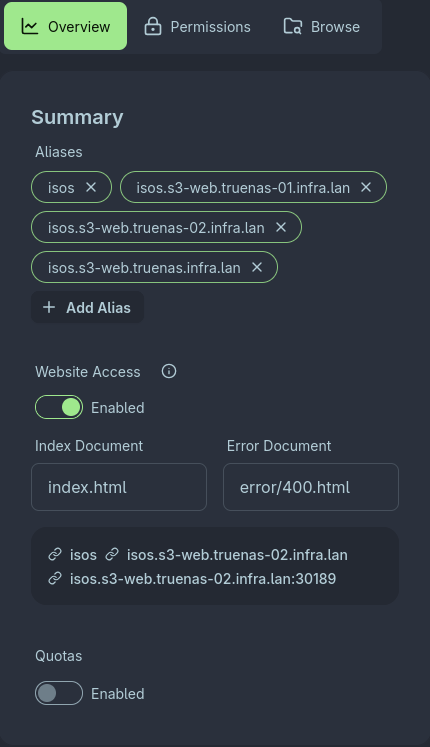
The ISO store can now be reached from any of the three FQDN aliases above. It is worth noting each alias will show up as a new bucket in clients like mc though. It may make things look a little cluttered, but the original bucket name isos remains, so its a small price to pay. An example using mc ls is below to demonstrate the point:
~/VMs/ISOs                                                        18:57:31
> mc ls truenas/
[2026-07-13 16:28:50 CDT]     0B isos.s3-web.truenas-02.infra.lan/
[2026-07-13 16:28:50 CDT]     0B isos.s3-web.truenas.infra.lan/
[2026-07-13 16:28:50 CDT]     0B isos.s3-web.truenas-01.infra.lan/
[2026-07-13 16:28:50 CDT]     0B isos/
Archived Sources
Each source listed above links to the relevant external resource, however for the sake of clarity, or in case any site becomes unavailable, for whatever reason, archived sources are listed below: